
State Management In React
Learn everything about state-management in react and get ready for your interviews.
What is State in React?
A react application consists of two things a state and a component, state refers to the changing parts of our react application. In a counter application for example the count is the state variable which keeps on changing as the user interacts with the application.
const [count, setCount] = useState(0);Why is State Management needed?
A component in react re-renders whenever the state used by that component changes and one key concept in optimising react applications is efficient management of this state because we want to minimise unnecessary re-renders that happen in our application.
Whenever re-render happens, React internally creates a lightweight copy of the real DOM called the virtual DOM, the new virtual DOM is compared with the old virtual DOM to find out the changed parts and then those parts are modified accordingly in the real DOM. This entire process is called reconciliation. Hence reducing unnecessary re-renders is crucial for performance optimization.
Where to place the state variables?
This question is important to address. React uses a tree like structure for its components and state, so if a component is placed higher up in the tree, then any change in the state would cause all its child components to re-render and at the same time since data flow in react is unidirectional i.e. from parent to child only and not vice-versa, if a component is placed lower down in the tree, then it might not be able to access the state it needs. Hence it is crucial to find a balance between these two extremes.
function Parent() {
  const [count, setCount] = React.useState(0);
  console.log("Parent rendered");
  return (
    <div>
      <div>Parent Component</div>
      <Child value={count} setValue={setCount} />
    <div/>
  );
}

const Child = ({ value, setValue } => {
  console.log("Child rendered");
  return (
    <div>
      <div>Child Component</div>
      <div>Value: {value}</div>
      <button onClick={() => setValue(value + 1)}>Increment</button>
    </div>
  );
});
In the above example the count state variable is placed in the parent component however it is used only in the child component. So whenever the count changes the Parent component re-renders and hence the Child component also re-renders. But what if the Child component is a heavy component and takes a lot of time to render? This would lead to performance issues in our application. Hence to avoid such scenarios, a general rule of thumb is to place the state in the Least Common Ancestor (LCA) of all the components that need to access that state. Let us understand this with an example.
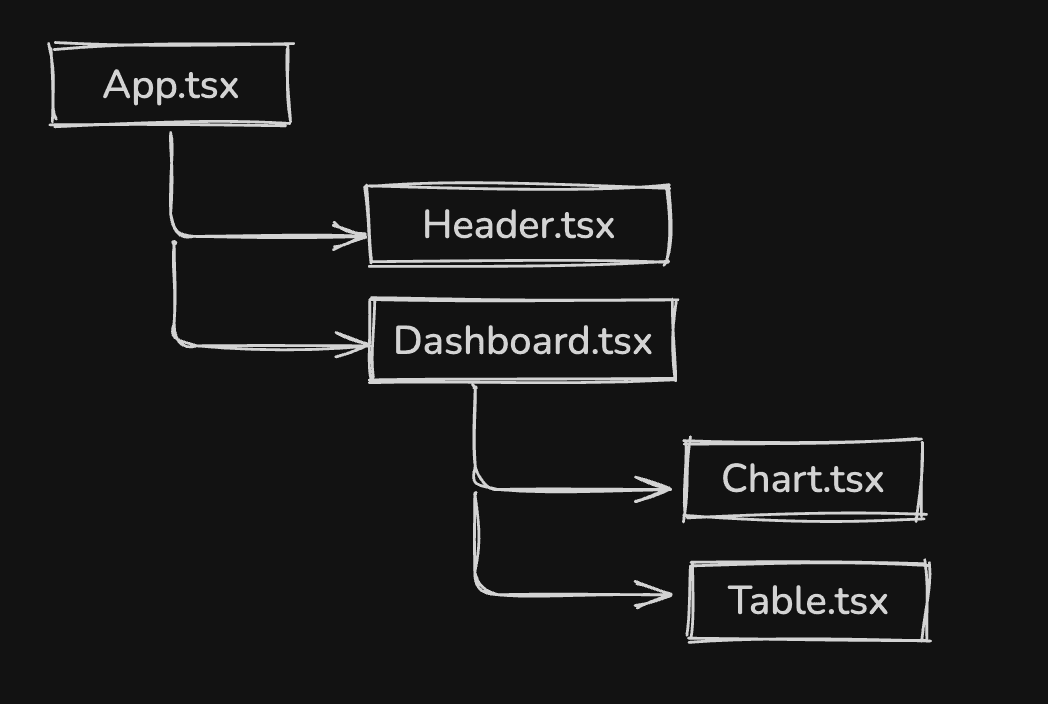
In the example above suppose some state needs to be used by both Chart.tsx and Table.tsx then the LCA would be Dashboard.tsx as it is the closest common ancestor of both these components.
But this approach has a common flaw, sometimes the LCA can be very high up in the component tree, so the props need to be drilled down through the ancenstors to make them accessible to the child components although the ancestors don't need it themselves. This makes the code syntactically ugly. Below example would make this clearer.
function App() {
  const [user, setUser] = useState({ name: "Shrijan", role: "Admin" });

  return <Layout user={user} />;
}

function Layout({ user }) {
  // ❌ Layout doesn't need user
  return <Sidebar user={user} />;
}

function Sidebar({ user }) {
  // ❌ Sidebar doesn't need user
  return <Profile user={user} />;
}

function Profile({ user }) {
  // ✅ Actually uses user
  return <h2>Hello, {user.name}</h2>;
}
In the above example the user state is placed in the App component. However both Layout and Sidebar components don't need the user state but still have to receive it as props to pass it down to the Profile component. This is called prop drilling and can make the code messy and hard to maintain. Also when the user changes the App component re-renders and hence all its child components re-render even though only Profile component needs the user state.
How to fix prop drilling?
The simplest solution to prop drilling is to use React Context API. Context API allows us to create a global state that can be accessed by any component in the component tree without the need to pass it down as props. This way we can avoid prop drilling and make our code cleaner and more maintainable. The below example illustrates this. Now the user state is placed in the App component and provided to the entire component tree using UserContext.Provider. Any component that needs the user state can access it using React.useContext(UserContext) without the need to receive it as props.
// ✅ Solution using Context API
const UserContext = React.createContext();

function UserContextProvider({children}) {
  const [user, setUser] = useState({ name: "Shrijan", role: "Admin" });

  return (
    <UserContext.Provider value={user}>
      {children}
    </UserContext.Provider>
  );
}
  // wrap your app with UserContextProvider
  <UserContextProvider>
  <App />
</UserContextProvider>


function Profile() {
  const user = React.useContext(UserContext);
  return <h2>Hello, {user.name}</h2>;
}
Did Context API solve unnecessary re-renders?
Although the Context API solves the prop drilling problem, it has limitations when it comes to re-renders. Whenever a context value changes, all components consuming that context re-render. In the previous example, since only the Profile component consumes the user context, it is the only component that re-renders when the user changes. However, this does not mean that Context API fully solves unnecessary re-renders. Suppose there is another component, ChangeUser, which also consumes the same context to access the setUser function. When the user state changes, both Profile and ChangeUser re-render, even though only Profile depends on the user value. This happens because context updates are broadcast to all consumers, and React.memo cannot prevent re-renders triggered by context changes.
State Management Libraries - the solution
Context API definitely did not help much hence many state management libraries exist some examples include Redux, Recoil and Zustand. We will proceed with Zustand because of its simplicity and ease of use.
When we use a state management library like Zustand, we get a shared or global state solving prop drilling and the components only subscribe to the values they needed so they re-render only for those values hence minimising unnecessay re-renders, optimising our application.
// store/useUserStore.js
import { create } from "zustand";

export const useUserStore = create((set) => ({
  user: { name: "Shrijan", role: "Admin" },
  setUser: (user) => set({ user }),
}));

// profile.js
import { useUserStore } from "./store/useUserStore";

function Profile() {
  const user = useUserStore((state) => state.user);
  return <h2>Hello, {user.name}</h2>;
}
With Context API, state typically lives high in the component tree and when the context value changes, all components consuming that context re-render. With Zustand, state lives outside React and components subscribe to specific slices of state, so only the Profile component re-renders when the user state changes. With zustand if other component like ChangeUser also subscribes to the setUser, it will not re-render when user changes, which context API couldn't achieve.
If there are any recommendations, feel free to reach out!